Folks - after a long hiatus and a partially successful launch (more later), I thought i'd update the blog for tech minded folks. About two years ago, I posted a diagram of what i thought the code should be on the Android phones, and two years on, it has moved a lot.
Let's just say, if i had to do this all over again, I would not use Android as an OS. I'm a less than average (part time/hobby) developer doing lots of low level stuff with the hardware, it just doesn't work as advertised, and the memory management is just killing me, even though I've tried to work around it several times.
Here's the schematic - descriptions below:
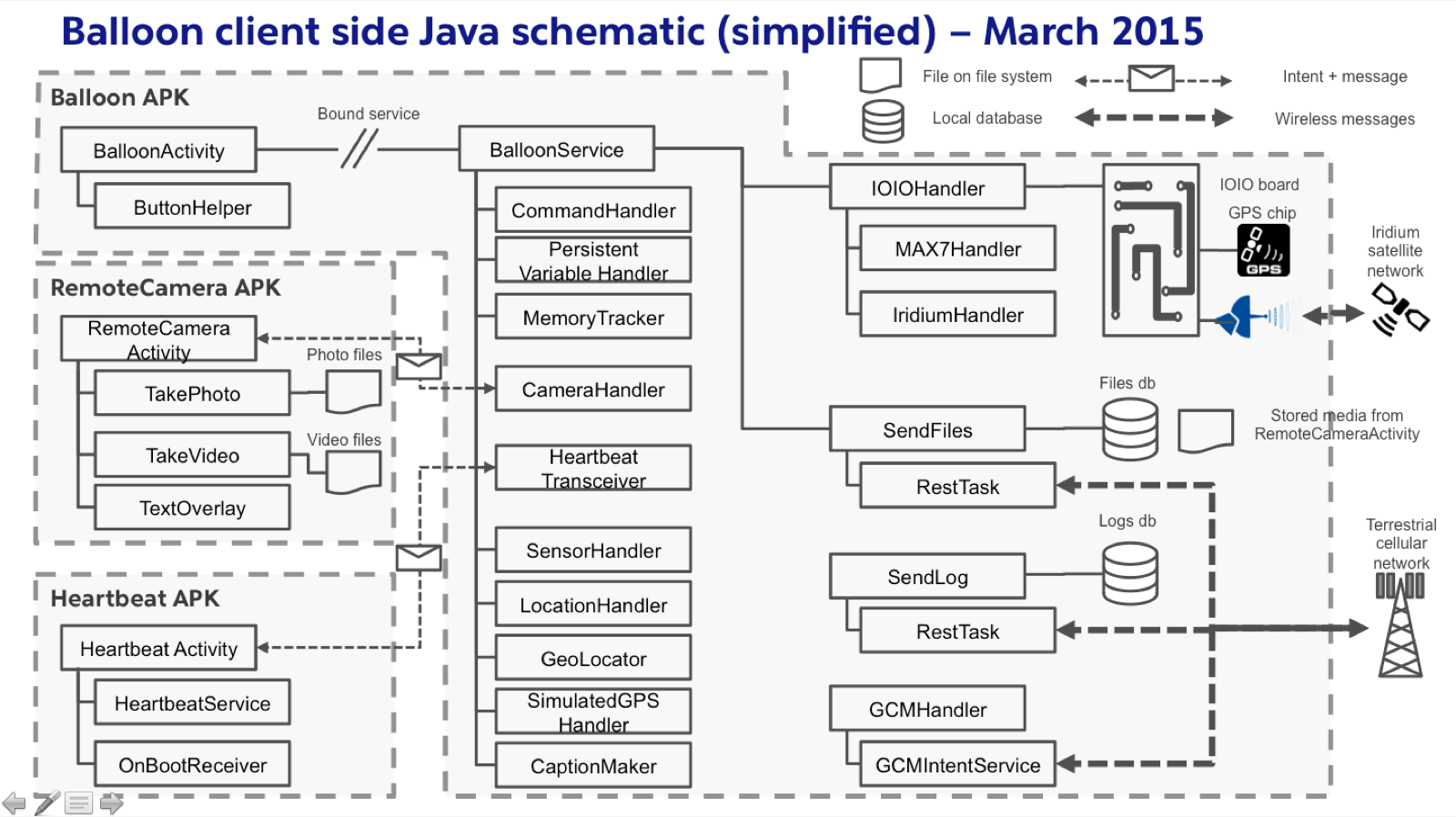
- So what's new? Most of this has been around reliability. We now have three APKs instead of just one, which would be much easier of course:
- Balloon APK - the core code that runs the robot, sends stuff etc.
- Added a class "PVH" or Persistent Variable Handler. This handles about 25 variables that need to be persisted in the event of an application crash, such that the app can recover to where it left off on a restart. It works! The app has crashed many times before (sometimes my fault even), and it can recover its exact state and continue, recovering useful stuff like phase of flight, which aircraft banks have been dropped, etc.
- Added a class "OnBootReceiver" (not shown). If the phone runs out of batteries and is found days, weeks, months later by someone, when the phone is turned on again, it will restart balloonservice and start splurging whatever data it has. This works too! During my last launch
- Added a class "HeartbeatTransceiver". This sends a "ping" to the separate service "HeartBeatService" every 30 seconds. This service is in another APK, therefore should not crash if BalloonService dies. It's really simple - if HeartBeatService in the other APK doesn't hear any ping in a 60 second interval, it sends an intent to restart BalloonService. I have noticed that with START_STICKY a service will be restarted perhaps 4 times after crashing before the OS decides it's a bad idea to try again. I can't have that, so this is my backup
- Added a class "IridiumHandler" to talk to the iridium modem that i just bought. This will send only critical updates (take-off, land, releases, burst, and 5 minute updates), as each message through a satellite network costs $0.15 or so. I build my own compression algorithm + lookup/reference table that BalloonService FTPs on startup. Using this, I can get everything non-verbose into a 44 byte message, then recreate it on the other end
- Added the ability to have a tertiary phone if needed. Not sure I'll use one
- I'm currently modifying SendFiles to allow more than one concurrent FTP session at a time to improve performance. I'll probably limit the number of active clients to 2 anyway, with one preferring shorter files, another longer files, per the altitude and bandwidth required prioritization
- Adding Splunk Mint Express to track down crashes and other major events
- Fixed a really stupid bug related only to Samsung phones. If i try to set the listener to send a location update after a time interval AND a minimum distance, it decides to send updates every second or so, running down the battery. Infuriating. The code snippet is: locationManager.requestLocationUpdates(LocationManager.GPS_PROVIDER, <INTERVAL IN MILLIS>, <MINIMUM DISTANCE IN METERS>, listener); Just leave zero for <MINIMUM DISTANCE IN METERS>
- Fixed a horrible bug related to memory leaks when FTPing large files using FTP4J (which is excellent otherwise). I can't tell whether it's FTP4J or Splunk that's crashing, but after about 15 megs sent it generates an out of memory error, and I'm pretty sure it's not my code. So, I interrupt the FTP sends every 8 megs max. Seeing i built it to be restartable, this has worked out OK. I lose a little speed, but that's better than a total fail