I'm finally getting close to a final version of the code. Given this is my first ever Java program for Android, it's taken me a long time to get here. Below is the schematic for how the software modules link together and communicate.
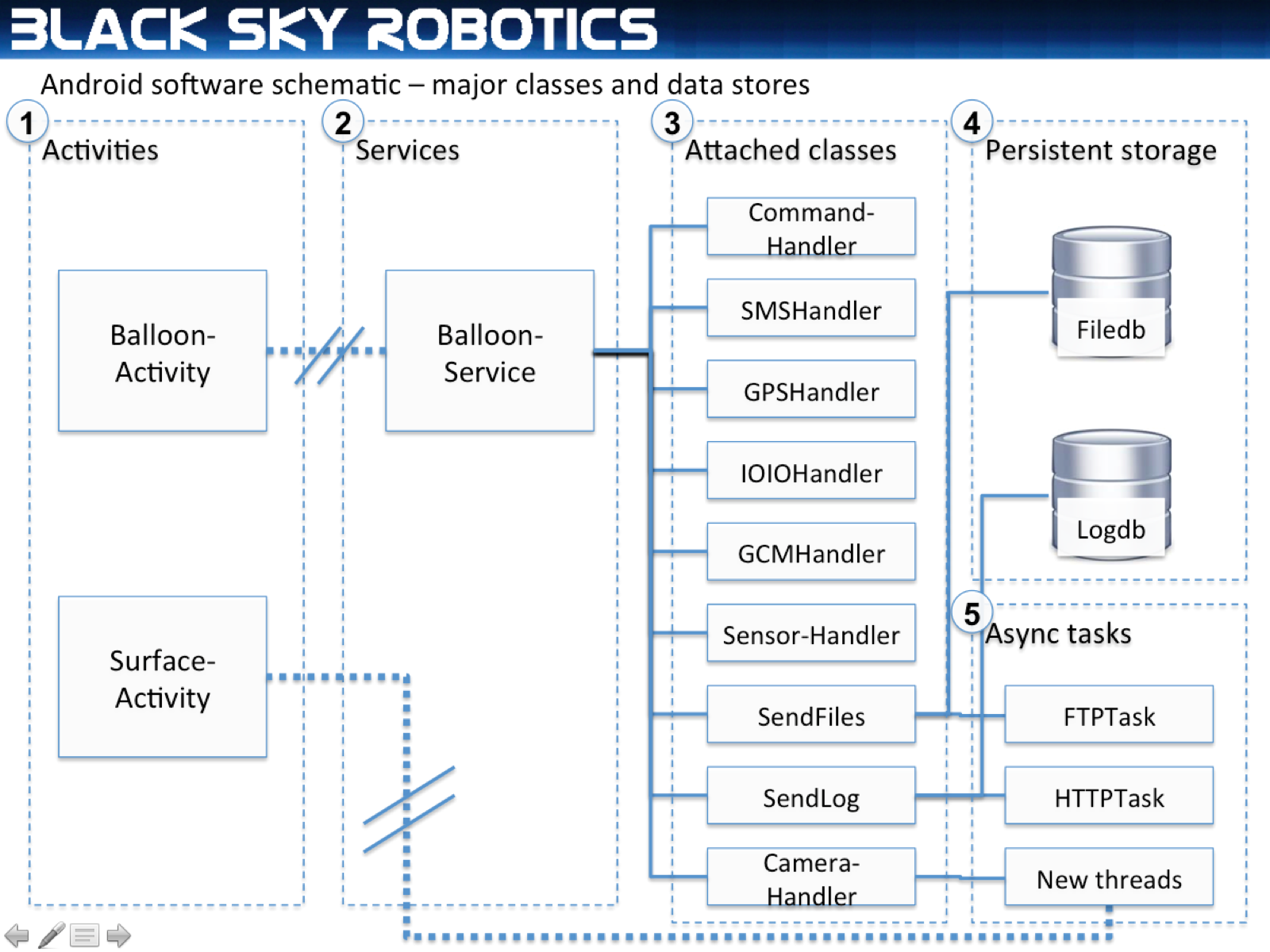
- Activities are screens that interact with a user, and that you can see on a phone. We have two:
- BalloonActivity. This is the first screen a user sees when the Balloon app loads. It lets a user test several things, show logs and status of the device and sensors, but otherwise is only used for debugging.
- SurfaceActivity. Android forces you to start a screen that a user can see before taking pictures, videos, etc. without their permission. We start this activity solely so we can take photos and videos without crashing Android.
- Services are persistent code blocks that can run permanently in the background. BalloonService is the mothership class that controls everything else, and executes incoming commands (or gives them to the relevant class) and polls CommandHandler to see if it needs to execute any commands triggered by hitting an altitude threshold.
- Attached classes have specific functions.
- CommandHandler - The balloon can execute a sequence of commands sent to it remotely (e.g. through GCM) or preset based on trigger altitudes or time intervals. Because the balloon will have no cellphone coverage above about 15,000 feet, the Android device will load up a list of trigger altitudes and commands (e.g. "Takephoto:caption=...", "release:1", "confirmrelease:1", "savebatteries:on") that it will execute at different altitudes. This class handles all that.
- SMSHandler - a simple class that provides a back door if the data network is not available for (a) critical messages from the balloon (e.g. location/battery stats and (b) lets me send remote commands to it.
- GPSHandler - a class that handles listening to internal GPS locations (which stop working above 60,000 feet) and locations taken from the external GPS chip and provides fallback logic so there's always either a valid GPS fix, or, worst case, an estimate based on extrapolating rates of ascent/descent. This also calculates when a balloon has taken off, burst, or landed. It also has a simulation mode to test that everything works as though it were airborne. Trust me I needed this.
- IOIOHandler - a class to communicate with an external IOIOBoard, which talks with the external GPS chip, temperature sensors, a 808 camera (pointed downwards), servos and buzzers etc. A big risk is unexpected voltage drops from batteries being too cold, too high a load from servos, etc., so there are some fallback modes built in.
- GCMHandler - GCM stands for "Google Cloud Messaging", which is a protocol that lets me send text based commands to the primary or secondary Android device. Sending commands remotely to test features is very handy.
- SensorHandler - A class that listens to lots of Android specific sensors - batteryPercentage, batteryTemperature, whether the battery is charging or not, Orientation, Accelerometers, and cellphone signal strength. Much of this isn't strictly necessary for the mission, but I collect it all, and the site graphs it all out.
- SendFiles - Critical stuff. A class (plus async classes) that (a) add a file with a priority tag to a database (b) FTPs these files based on priority to the blackskyrobotics servers when cellphone data coverage is available. In this way, we can prioritize and send high value, lower file size stuff first when the balloon is on its way down, so if we've only 15 minutes of data/FTP time before the balloon lands in a ravine or something, we've got the good stuff. This leverages FTP4j to send files. There's basic file restart capabilities if a transfer gets interrupted.
- SendLog - Critical stuff #2. This sends logging information like the following: "VAR:batteryPercent=56&batteryTemperature=32.0&device=primary" to the blackskyrobotics server. It stores all messages in a database and tries to send batches of 5-50 messages every 6 seconds (depending on success rate it adjusts) in a LIFO fashion, so that the server always gets the freshest, most relevant data to look at. There are about 10 messages stored per minute when the external GPS chip is sending, so there will be a big backlog of data to send when the balloon descends back into coverage
- CameraHandler - A class to handle taking photos and videos. When it takes a photo it stores a hi-res photo (~1.6 mb) and shrinks it and stores a lo-res photo (~80kb) and gives the lo-res photo a much higher priority in the database so that it gets sent first. When it takes a photo or video, it starts up SurfaceActivity (basically a preview screen) otherwise it won't take videos.
- TextToSpeechHandler - A simple class used to say things like "Release 1 at 92,000 feet" while a video is being recorded.
- Persistent storage - all based on Android's embedded SQLite database
- Filesdb - stores a filename, its size, whether its been sent yet, and its priority. Priority is set by whatever's putting something in the database, and lower filesize, higher altitude media files score highly, with an additional over-ride for photos and videos taken during release.
- Logsdb - stores a text message, its origination timestamp, unique ID, and whether its been sent or not. SendLog, which uses this, waits for the server to confirm each unique ID before it marks any log as sent, so we have guaranteed delivery.
- Async tasks - basically new threads using Android's AsyncTask to do stuff in the background
- FTPTask - FTPs files in the background, and occasionally sends a status message (filename, percentage complete) if it's taking a long time.
- HTTPTask - Sends batches of text logs in the background.
- Camera threads - manage starting/stopping video etc. for preset time lengths